
Vector Coil Calibration (For Sensors with Vector Add-On)
Ensure your Gen-2 QTFM sensor’s firmware is updated to version 1_36, released on October 4th, 2024, to support vector coil calibration. If the firmware is outdated, follow the firmware update guide to upgrade before proceeding.
Steps for Vector Coil Calibration
- Prepare the Sensor:
- Navigate to the ‘Terminal’ tab in the user interface.
- Let the sensor complete autostart and confirm the cell locks. For best calibration results, allow the sensor to run for about 5 minutes before proceeding.
- Verify Sensor Mode and Data Output:
- Ensure the sensor is in vector mode and check that the X, Y, and Z data outputs are valid. This step is crucial to ensure the accuracy of the calibration.
- Initiate and Monitor Calibration:
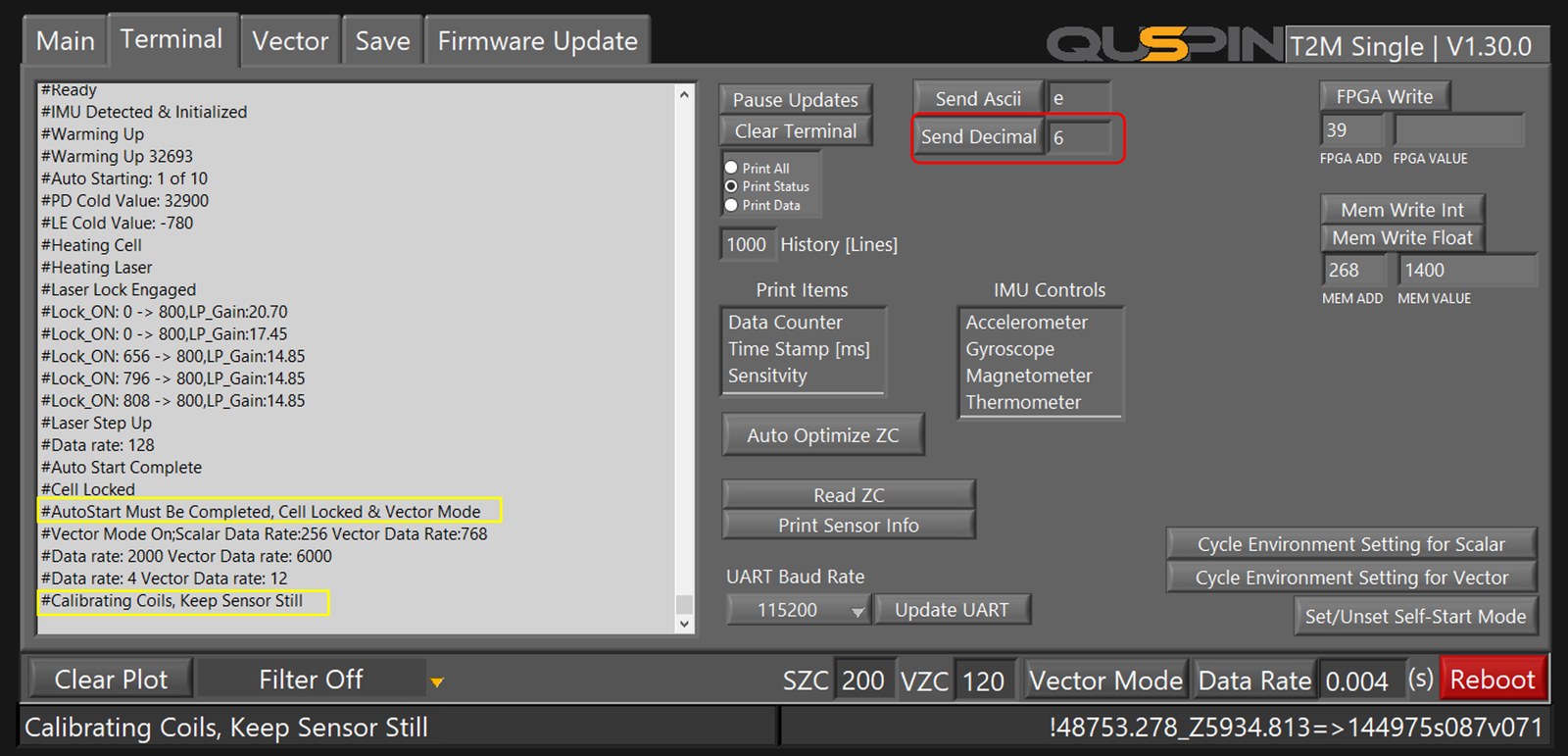
- Use the ‘Send Decimal’ button to send decimal command ‘6’ to the sensor. You should see a message: “#Calibrating Coil, keep sensor still.” Calibration typically takes 1–2 minutes.
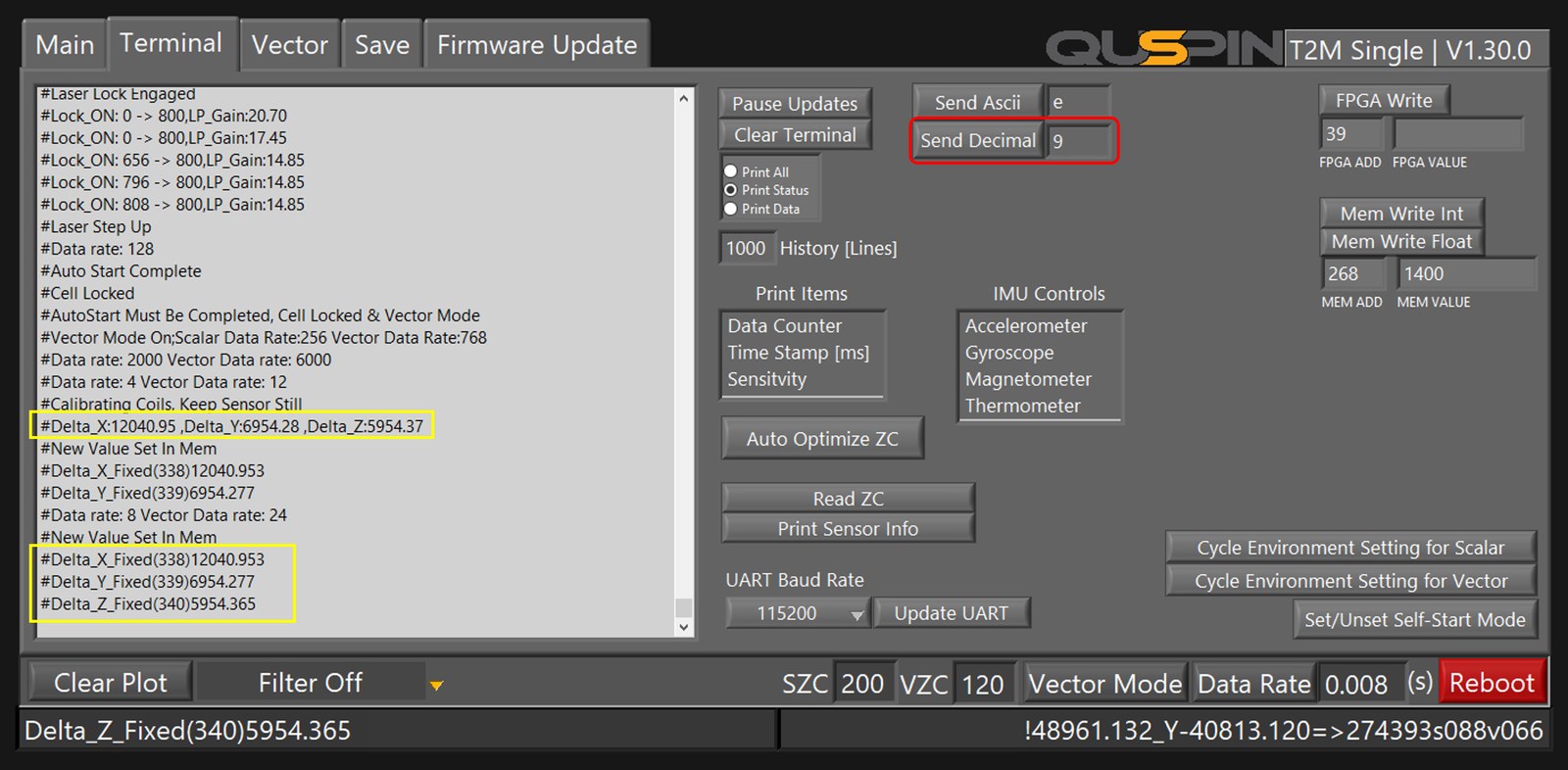
- Once calibration is complete, a status update will display the delta values for each coil, such as “#Delta_X:12040, Delta_Y:6900, Delta_Z:5954”.
- Lock Calibration Values:
- To permanently store the new calibration values, use the ‘Send Decimal’ button to send command ‘9’. This final step updates the internal memory with the newly calibrated vector coil values.
One command does both steps (firmware V1_46 and later) ~Recalibrate_Vector_Coils~ runs the calibration (command 6) and saves the result
(command 9) in one step. The preconditions are the same: the sensor locked and running with
vector mode on, and held still until it reports completion.
Conclusion: Benefits of Vector Coil Calibration
Following the streamlined steps outlined above, your Gen-2 QTFM sensor will be accurately calibrated for the vector coils. Calibration enables the use of the new Enhanced Vector Mode, introduced in firmware version V1_36 and later. This mode is the default setting when vector mode is enabled (#Vector_Mode: 0), and outputs vector data similarly to previous versions.
Advantages of Enhanced Vector Mode
- Increased Tolerance to High-Frequency Noise: The Enhanced Vector Mode significantly improves the sensor’s ability to handle high-frequency noise, effectively increasing the bandwidth of each vector axis.
- Optimized for Magnetic Surveys: This mode is recommended for conducting magnetic surveys due to its enhanced sensitivity and noise tolerance.
Consideration
- Initial Drift in Cold Start: One drawback of the new vector mode is that the sensor may experience drift for about 5 minutes when cold-started.
Hardware Note
No board modification is required. Current vector electronics ship with the improved sensitivity and high-frequency tolerance built in, and Enhanced Vector Mode provides the rest in firmware — there is nothing to desolder or replace.
Note Older guidance described replacing resistors on the top ECU board to boost vector performance. That modification is no longer needed on current hardware. If you are unsure which revision you have, contact info@quspin.com before making any change.